10 Things CEOs Need to Know About Design
View more presentations from Jason Putorti.
10 Things CEOs Need to Know About Design
Thanks to Lee & Sachi LeFever at commoncraft
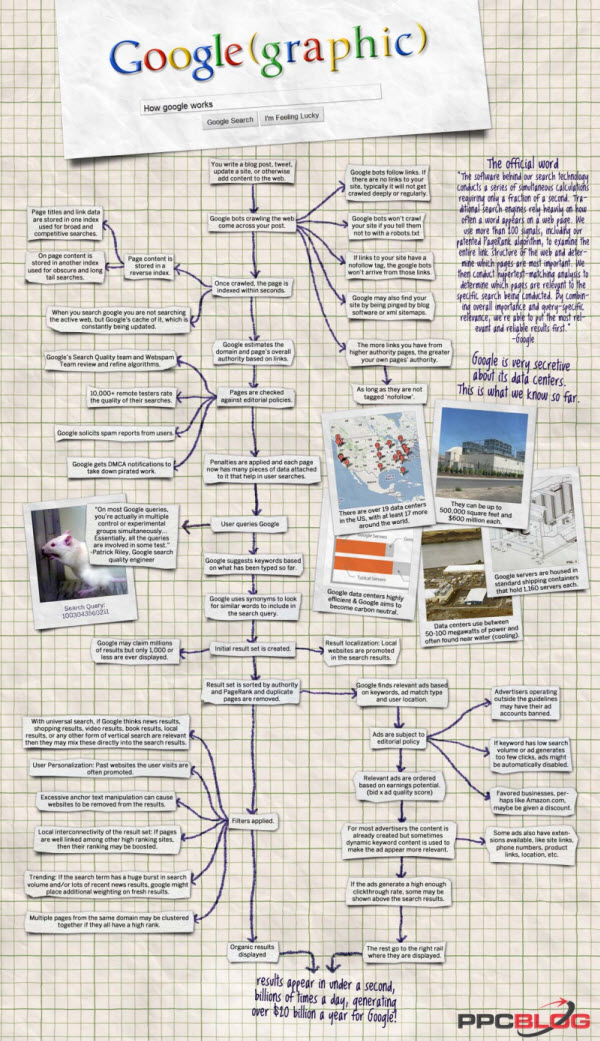
Infographic by PPC Blog
Google has confirmed that Adobe Flash will continue to “play a critical role” on YouTube, saying the fledgling HTML5 video tag doesn’t meet the site’s needs.
“It’s important to understand what a site like YouTube needs from the browser in order to provide a good experience for viewers as well as content creators,” reads a Tuesday blog post from YouTube software engineer John Harding. “We need to do more than just point the browser at a video file like the image tag does — there’s a lot more to it than just retrieving and displaying a video.”
http://account.theregister.co.uk/register/?product=theregister_newsletter” target=”_blank” />
For more than a year, Google has publicly backed HTML5 and other web standards as the future of computing applications. Since January, the company has offered an “experimental” HTML5 player on the site. And it’s now encoding videos with its newly open sourced WebM codec, designed to be a royalty-free means of encoding video for use with the HTML5 video tag. But Harding makes it clear that Google has no intention of pulling Flash from the site anytime soon.
The primary problem with HTML5 video, Harding says, is that browser makers have yet to agree on a standard codec. Though Google, Opera, and Mozilla are firmly behind WebM — based on VP8 codec Google acquired when it purchased video compression outfit On2 Technologies — it seems that Apple and Steve Jobs have no intention of making the switch from H.264, the patent-backed codec licensed by the MPEG LA. Meanwhile, Microsoft is sticking with H.264 on its upcoming IE9, though the company says it will allow surfers to use WebM if they install it on their own machines.
Apple and Microsoft are both members of the H.264 patent pool, and the MPEG LA has indicated it intends to create a new patent pool that would attempt to license WebM, challenging Google’s efforts to make it royalty-free.
As the two camps battle it out, YouTube will continue to use … H.264. This is the codec that backs Flash video, and YouTube has been encoding in H.264 since 2007. “First and foremost, we need all browsers to support a standard video format. Users upload 24 hours of video every minute to YouTube, so it’s important to minimize the number of video formats we support,” Harding writes.
“Concerns about patents and licensing have prevented some browsers from supporting H.264; this in turn has prevented the HTML5 spec from requiring support for a standard format. We believe the web needs an open video format option. One that not only helps address the licensing concerns, but is also optimized for the unique attributes of serving video on the web. To that end, we’re excited about the new WebM project.”
Er, well, this we knew.
Google could surely advance the WebM cause by switching YouTube to the format entirely and moving the site to HTM5. But Harding says the company is unwilling to do so, thanks to several limitations with the <video> tag. HTML5, Harding says, is limited when it comes to DRM, full-screen video, or camera and microphone access. Plus, it can’t do “robust video streaming.”
“As we’ve been expanding into serving full-length movies and live events, it also becomes important to have fine control over buffering and dynamic quality control,” Harding says. “Flash Player addresses these needs by letting applications manage the downloading and playback of video via Actionscript in conjunction with either HTTP or the RTMP video streaming protocol. The HTML5 standard itself does not address video streaming protocols.”
And it doesn’t allow users to easily lift video from YouTube and embed it in other sites. “Flash Player’s ability to combine application code and resources into a secure, efficient package has been instrumental in allowing YouTube videos to be embedded in other web sites,” Harding continues.
“Web site owners need to ensure that embedded content is not able to access private user information on the containing page, and we need to ensure that our video player logic travels with the video (for features like captions, annotations, and advertising). While HTML5 adds sandboxing and message-passing functionality, Flash is the only mechanism most web sites allow for embedded content from other sites.”
Meanwhile, Steve Jobs has banned Adobe Flash from the iPhone, the iPod touch, and the iPad, while publicly badmouthing the technology. And given its ongoing need for Flash, Google is working to cement the platform’s position on other devices. Google’s Chrome browser now includes a built-in Flash plug-in that automatically updates with new versions, and the company is now including the player with its Android mobile OS.
You could argue that Google’s ongoing Flash support will hamper the progress of HTML5. But at least for the moment, Mountain View is intent on playing both sides. “We’re very happy to see such active and enthusiastic discussion about evolving web standards — YouTube is dependent on browser enhancement in order for us to improve the video experience for our users,” Harding concludes.
“While HTML5’s video support enables us to bring most of the content and features of YouTube to computers and other devices that don’t support Flash Player, it does not yet meet all of our needs. Today, Adobe Flash provides the best platform for YouTube’s video distribution requirements, which is why our primary video player is built with it.” ®

Chinese people should soon find it easier to browse the web as domain names written in Chinese win approval.
Net address overseer Icann has approved the creation of domains that use only Chinese characters.
The decision builds on earlier work to create internationalised domain names (IDNs) using with non-Latin characters.
The first IDNs were for Arabic scripts and Egypt, Saudi Arabia and the United Arab Emirates were the first to register domains using them.
Icann said firms in China, Hong Kong and Taiwan would soon be issuing domains for people and organisations within their countries that are written with all Chinese scripts.
“One fifth of the world speaks Chinese and that means we just increased the potential online accessibility for roughly a billion people,” said Icann head Rod Beckstrom in a statement.
He said the decision goes some way towards addressing the contradiction that 60% of the net’s users are non-native English speakers yet the dominant language online is English.
This is because when the domain name system was set up addresses, such as the familiar .com and .uk, were written only with Latin characters.
Workarounds for this have been developed which mix Latin and native character sets. Mr Beckstrom said many years of work by the Internet Engineering Task Force had made it possible to use domains written completely in one text.
Icann said that IDNs in 20 languages were being prepared with Thai and Tamil expected to follow soon.
News about the decision was released at the 38th international Icann meeting held in Brussels from 20-25 June.
At the same meeting the .xxx domain, which will cater to pornographic websites, also won approval.
The Business Link website costs £2.15 per visitor, it has been revealed, as the government announces plans to close up to 75% of publicly funded sites in an effort to save millions of pounds.
According to a report by the Central Office of Information, the running of 46 government websites cost £94m plus £32m in staffing costs in 2009/10.
The most expensive was BusinessLink.gov.uk, which provides advice to small companies, at a cost of £35.78m. That equates to £2.15 per visit. The UK Trade and Invest website cost much less at £4.7m but attracted only 399,501 users representing £11.78 per visit.
Following the findings, ministers said they intend to axe up to three quarters of the total 820 government-funded sites and force those that remain to reduce costs by 50%.
Shocking!
When buying ads on Facebook, which model gets you the best return on your advertising spend? In an effort to develop Facebook advertising strategies, many internet marketing experts have postulated the best way to buy advertising on Facebook. Some have argued for CPC ads, some have argued for CPM ads. Either way, these arguments were backed up with very little solid data and as such, have questionable validity. To help explore which method is truly optimal, we conducted a test in order to provide some hard data behind our recommendation.
Based on our analysis, we found somewhat mixed results. The CPC buy had a higher CTR, lower CPC, and higher percentage of unique impressions while only performing slightly worse than the CPM buy in terms of CPM. Overall, when comparing the CPC and CPM methods of buying on Facebook, for the same budget the CPC campaign ads were shown to 50% more unique people and generated 150% more clicks. The CPM buy did get more impressions overall for the budget, but it seemed to fall short by every other measure. Because of this, we conclude that the data indicates that CPC is the preferred way to buy ads on Facebook for the majority of advertisers.
Download the full report here: Facebook Advertising Best Practices: CPC vs. CPM Buys
Bing Has A New Look, Now Hosts Deep Content In Search Results
Jun 23, 2010 at 2:14am ET by Matt McGee
While Bing is throwing a star-studded party to announce changes to its entertainment-based search results, there are several other changes that deserve a close look, not the least of which is the amount of deep content — including full articles with thousands of words — that Bing is now hosting in its search results. More on that in a bit.
Look & Feel
Let’s start with the overall new look and feel that Bing has announced. The biggest change is that search options — or, Quick Tabs in Bing-speak — have been moved from the left-side column to immediately under the search box at the top of the page. Bing calls this the Answer Bar.
Just like before, the tabs will change depending on the query; the U2 search above has tabs for Songs, Albums, and Videos that are obviously query-specific. In order to make the Quick Tabs more visible below the search box, Bing’s background “image of the day” has been cut down in size pretty substantially, and you can barely tell what it is now. (If you care, that is.)
The left-side column, meanwhile, still has Related Searches and links to your recent searches; these are now easier to access because the Quick Tabs don’t take up several hundred vertical pixels above them.
What’s unchanged is the inclusion of categorized results further down the search results page.
But beyond the new Answer Bar at the top of the search results page, Bing has made some pretty substantial additions and changes to the search results for certain verticals, like Autos, Finance, and Health.
Bing: Autos
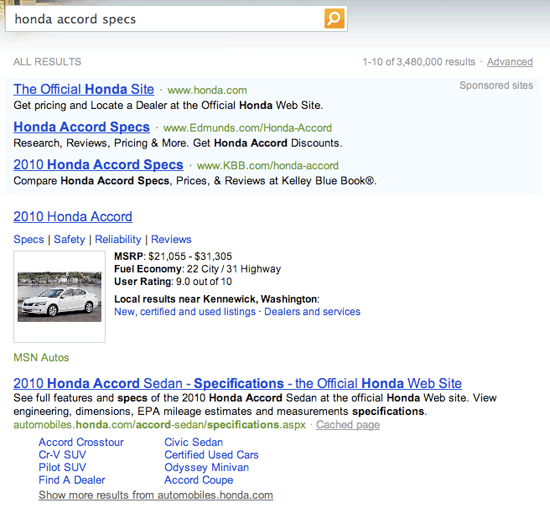
Consider a search for honda accord specs. On the old Bing interface, you’d get a pretty standard page of search results with a little bit of information about the car in Bing’s standard Instant Answer.
In the new interface, auto-related searches that include the word “specs” (and perhaps other terms; I haven’t been able to trigger it, though) send you directly to a new Quick Tab with what appears to be a pretty complete look at the Honda Accord’s specs.
The data comes from MSN Autos, and each of the orange headings you see above (Pricing & Warranty, Fuel Economy, etc.) links to further information at MSN Autos.
Bing: Finance
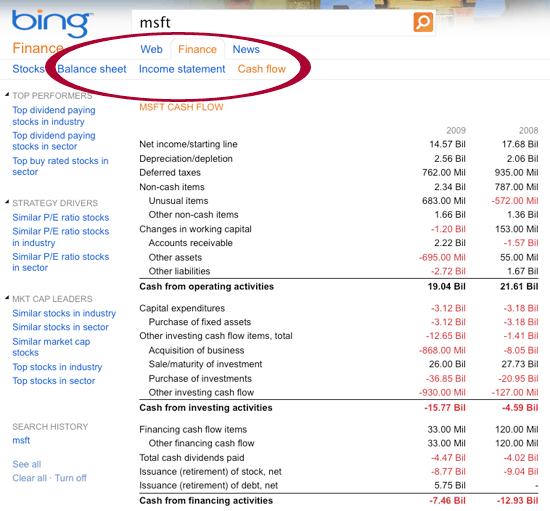
Bing has been strong in finance-related searches, and already shows a wealth of company information on searches that involve company stock ticker symbols. Do a search for MSFT and then click the “Finance” Quick Tab on the left, and you would see a page like this:
But, as part of the new interface, Bing has added several new content pages underneath the Finance Quick Tab that give investors faster access to deeper company information. You can see links (below) for Balance sheet, Income statement, and Cash flow — each one is a page of data like this:
Bing: Health
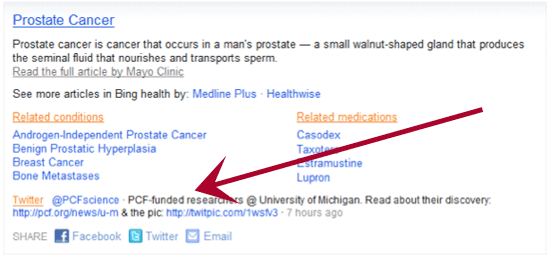
Coming later this week will be a variety of upgrades to Bing’s search results and interface for health-related searches. One is the addition of authoritative Twitter updates to the existing Instant Answer for medical conditions. Here’s a look at what the Instant Answer for prostate cancer will look like:
The tweet above comes from the Prostate Cancer Foundation. Bing says the tweets will only come from authoritative sources and will appear when relevancy and recency standards are met; the tweet above mentions a new discovery related to prostate cancer, which is a piece of information that the Instant Answer might not otherwise have shared with searchers.
More important than that, though, is Bing’s integration of content directly in the search results via partnerships with a variety of well-known health industry sources.
Do a search for diabetes, for example, and the initial search results include Bing’s standard Instant Answer. But there’s a new Health Quick Tab at the top of the page, and under that tab is a detailed article from the Mayo Clinic.
There’s also a box for “related articles,” all of which link to additional articles hosted by Bing.
Bing has had health information from the Mayo Clinic (and others) in its Instant Answers since day one, but this is much more than Instant Answers. This is full content articles acting like a search results page (or tab, in this case). How detailed and lengthy is that Mayo Clinic article on Bing? It’s a collection of the 10 articles that appear on the Mayo Clinic’s diabetes page — mirroring the ten links on the left side of that page (Definition, Symptoms, Causes, etc.). I cut-and-pasted Bing’s version into Microsoft Word: It took up eight pages and shows a word count of 5,264.
Final Thoughts
With this latest round of changes, Bing continues to drive home the idea of being a “decision engine” — getting searchers the information they need to take action right from the search results, or with as few clicks as possible from the search results.
Bing says that the new Answer Bar increased user engagement during its internal testing, and also helped to decrease the number of manual re-queries. Bing says that’s a sign that searchers are getting the information they need.
What’s very important in all of this, I think, is the increase in real information sitting on/in Bing’s search engine — the type of stuff search engines typically just provide links to. Whether it’s full specs for a new car, a company’s complete and current balance sheet, or an 8,000+ word article about diabetes, this is new. Search results are now content.
Note: Some Bing users may not see all of the changes at this time while the updates are rolling out; the Health updates, in particular, aren’t due to go live for a couple days.
Bing’s still hated though