Ever wonder how you can upload a video of your dog playing in the park to YouTube from your phone one minute, and have someone else watching it at their home a few minutes later?
Time Warner Cable breaks it all down in this simple infographic.

Rightmove launches mobile site to cater for Android users | Econsultancy
Having already launched apps for iPhone and iPad, property search website Rightmove has moved to cover other devices with a new mobile website.
The new site is built in HTML5, and replicates the GPS and mapping features of the app, and extends Rightmove’s reach to the rest of the 13m smartphone users in the UK.
Anecdotal evidence, as well as that from research firms, is that Android is gaining mobile market share rapidly, thanks to having multiple devices on the market at a range of prices that Apple cannot match.
For brands, this means that launching a mobile presence through iPhone apps alone is no longer an option if they want to gain maximum exposure. With a number of app platforms to cater for, a mobile website is the easiest way to appeal to as many mobile users as possible.
According to Stephen Mellish of 2ergo, which developed the mobile site for Rightmove:
“With the increasing reach of operating systems such as Android and the ever growing number of alternative options, mobile sites create a more inclusive way to target users. HTML5 is also allowing brands to replicate the feel of an ‘app’ through an mobile site which is increasing its appeal to marketers.”
I reviewed the Rightmove iPhone app last year, and it is a very useful and feature rich app, and the mobile site is equally impressive. As Stephen Mellish says, it manages to recreate the feel of an app and, having tried both site and app, it’s hard to find any major differences.
This doesn’t mean that brands shouldn’t develop iPhone apps though. While Android is growing fast, the iPhone still accounts for the majority of mobile internet usage, and most firms will see the majority of their mobile traffic coming from Apple devices.
This is certainly the case with Rightmove. While 12% of visits to Rightmove from mobile devices are from Android phones, and 8% from Blackberries, the iPhone still accounts for 52%, and the iPad 12%.
Also, exposure for brands via the App Store can be valuable for building awareness of brands’ mobile presence. Rightmove’s iPhone app has been a success so far, having had 800,000 downloads over the past year, and it currently drives more than 1,000 leads per day to estate agents.
When I looked at the pros and cons of mobile sites and apps earlier this year, one of the biggest arguments for the app was greater functionality for users offered by apps; features such as finding a user’s location via GPS, and barcode scanners.
However, if these functions can be replicated on mobile websites, if the handset allows, then the argument for developing a mobile website rather than an app becomes even more convincing.

via econsultancy.com
Why Your Business Needs a Mobile Commerce Strategy Now
Remember when people debated whether e-commerce was for real? When the media scoffed at the idea of being able to “just point and click for great deals?”
Today, e-commerce is a massive industry. In the U.S. alone, online spending reached nearly $130 billion in 2009. Like e-commerce before it, mobile commerce is on the cusp of becoming a multi-billion dollar industry, and it’s time for merchants to take notice and seize the opportunity.
M-commerce by the Numbers
At PayPal, when we look at our merchants’ numbers, we’re seeing the impact of mobile commerce jump:
- Our mobile transactions show dramatic growth, increasing nearly six-fold, from $25 million in 2008 to $141 million in 2009.
- We expect to close out 2010 with over $500 million in mobile payment volume, and more than 5 million members regularly using PayPal from mobile devices.
But we’re just a slice of the overall m-commerce pie:
- Globally, consumers are expected to spend $119 billion by 2015 through their mobile phones, accounting for about 8% of all e-commerce activity, according to ABI Research.
- The total value of mobile payments around the world will quadruple from $170 billion in 2010 to $630 billion in 2014, according to Juniper Research.
From point of sale offerings, to mobile shopping apps and enhanced mobile web experiences, it seems like companies both big and small are trying to capitalize on what mobile commerce promises consumers.
Though much attention has been paid to how consumers are adopting a mobile shopping experience, little consideration has been paid to how merchants can get in the game. In my years helping merchants of every size enable sales on the “third screen” (with televisions and computers as the first and second screens), a few things have held true in most of the successes I’ve seen.
Mobile Browsing vs. Mobile Shopping
The numbers speak for themselves, so it’s fair to say that consumers are rapidly adopting mobile shopping as a way to buy physical and digital goods. This rapid adoption rate means customers are starting to expect that their favorite retailers will have a mobile presence, making mobile commerce both an opportunity and an imperative for merchants.
Realizing measurable gains from engaging with these tech savvy shoppers means understanding what motivates them to complete a mobile purchase. Consider the difference between “mobile browsing” and “mobile shopping.” Applications and websites that allow customers to view the latest fashions are great for brand awareness, and maybe even getting them in the physical store, but without a mobile-specific checkout experience, they don’t yield actual sales. I call that mobile browsing because making the purchase is secondary to just looking at the item for a price tag.
Mobile shopping on the other hand, offers consumers the chance to buy something in a checkout experience catered to a mobile device and perhaps most importantly, reduces the amount of clicks it takes to finalize the purchase. This is particularly important in the context of mobile web browsers, where cutting back on content and minimizing the number of clicks is vital to keeping shoppers engaged.
I spend a lot of time on my phone checking out how retailers are taking their online stores mobile. I’ll log onto a retailer’s mobile website which allows me to look at all the merchandise I want. Content loads quickly and after a pleasant and easy browsing experience, I decide to go ahead and make the purchase.
As is all too common with mobile shopping, I’m taken to a third-party checkout site that is not catered to a mobile browser. Instead of making a couple of clicks, I find myself scrolling, re-entering sensitive information, resizing the screen, ultimately getting frustrated and abandoning the purchase.
As a retailer, it’s critical that your mobile customer has the same level of convenience that they would have if they were shopping on their laptop with a checkout experience that’s designed for the device.
A number of retailers have successfully brought easy shopping experiences to mobile platforms. Buy.com, for example, has tailored their mobile website for intuitive shopping and quick checkout. While developing a mobile shopping experience is more art than science, layouts with large buttons, minimal text, little scrolling and a fast checkout have proven key to conversion.
The Mobile Web vs. Native Apps
Much has been made of whether the future lies in mobile applications or the mobile web. Both apps and browsers offer compelling characteristics that, in the context of mobile commerce, can draw in shoppers.
Mobile apps are like your neighborhood produce store. You walk inside the doors looking for specific items. They also typically let users tap into their phone’s full potential. For example, a native app might integrate with a phone’s camera, voice recorder, contacts or other features. And for shoppers looking for a richer, more advanced interface, applications typically win out over the mobile web because they are designed specifically for that handset’s hardware and operating system.
Overall, native apps offer a tailored shopping experience that’s well delivered but limited.
The mobile web on the other hand is a like a huge shopping mall with seemingly limitless stores and tons of options all under one giant roof. It’s not as constricted or fragmented as shopping on disparate mobile apps but the experience isn’t as tailored as the specialty store.
Unlike device-specific native apps though, the mobile web has enormous flexibility and, usually, much larger reach. Customers don’t need to download robust programs from app stores to their handset in order to begin shopping. Instead, all they have to do is type in a web address in their mobile browser to start spending their digital dollars. Much of the time mobile sites serve as stripped-down versions of regular websites and serve a utilitarian purpose: selling goods and services.
The mobile web offers what native apps lack and vice versa. And just as in the real world, there’s room for both. As long as there is an easy way for consumers to shop from their mobile devices, both apps and browsers serve a purpose for retailers.
Get Ready: The Holidays are Coming
With the biggest shopping season of the year just weeks away, now is the time for retailers to look to the mobile channel to boost sales and meet their customers where they want to be met.
Last year, PayPal saw mobile payments on Black Friday rise about 650% compared to 2008. This year, the holiday season will be a pivotal time for retailers to capitalize on the mobile opportunity as the market really becomes mainstream.
Right now, merchants from small businesses all the way to the largest companies in the world are finalizing their strategies for the holidays. They’re thinking about how many MP3 players to keep in stock and how to get feet in the door, and which demographics they should be targeting once the doors fly open on Black Friday. But maybe this year, the smart merchants will think back to the 1990s –- to the birth of e-commerce — and decide to act on the opportunity that mobile commerce opens up, and to change the relationship with their customers once again. E-commerce drove sales, but also more importantly it changed merchants’ relationship with their customers. And mobile commerce has the potential to do it all over again.


via mashable.com
Good Domain Names Grow Scarce – Inc. Article
Eli Altman has been naming things for most of his life. At age 6, he helped his father, Danny Altman, the founder of the San Francisco branding consultancy A Hundred Monkeys, on a naming project for the toy store FAO Schwarz. He has named 400 companies and brands since and joined his dad’s business in 2002.
But a couple of years ago, Altman started noticing what he saw as a distasteful trend: a wave of nonsensical names. Whereas the rules of English usage dictate that an e or an o usually precedes an r, entrepreneurs were starting companies with names such as Flickr, Socializr, and Touristr. Others were doubling or even tripling their o’s, i’s, and u’s — as in Zooomr, Rowdii, Yuuguu, and even Oooooc. With the rise of the Internet, names made of words that mean something, like Apple Computer, went out of favor. “Everyone wants these short, catchy names,” says Altman.
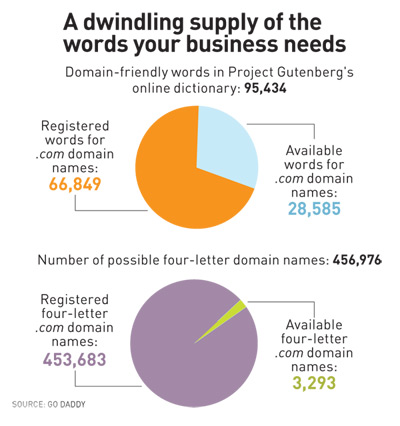
Web addresses are cheap — less than $10 a year in most cases — and trillions of them are still available. The problem is that short, pronounceable names ending with the popular .com extension are increasingly rare. “All the normal words in spoken English are taken,” Altman says. “Any short combination of letters and numbers is taken. Anything good under six letters is taken.” The result has been a proliferation of silly-sounding company names, with a recent trend toward handles that sound as if they might have come from science fiction. (One software company set up a website that challenges readers to discern between companies and Star Wars characters. For instance, Sebulba is from the fictional planet Malastare; Oyogi is a software maker in Raleigh, North Carolina.)
Some 80 million .com domain names are currently registered, a bit more than 800 times the number of domain-friendly words in Project Gutenberg’s online dictionary. Registered names proliferated after Google introduced its automated advertising system, AdSense, in 2003. The service made domain speculation — or domaining — a much more profitable business, allowing domainers to buy names and hold on to them indefinitely while making money with advertising.
Today, millions of names are available on auction sites such as Sedo.com and SnapNames.com, at prices that range from a few hundred dollars to hundreds of thousands of dollars. ZX8.com was recently on offer for $330, while Mouse.com was going for $350,000.
What should companies that still hope to snag unclaimed names do? Altman says there are plenty of words available to go along with extensions like .net. But most consumers expect for-profit companies to have .com names. “Dot-com is just where customers’ minds are,” says Bob Parsons, founder of Go Daddy, the largest registrar of domain names. Christopher Johnson, author of the blog The Name Inspector, says that longer domain names can be just as effective as shorter names so long as they have “recognizable parts,” like Craigslist or Photobucket.
As available names dry up, entrepreneurs are scrounging around for what’s left. David Rusenko, the founder and CEO of a website and blog-building service, wrote a software program that randomly generated short, pronounceable names available for purchase. A lot of the names the program spit out contained multiple z’s, but Rusenko found his name, Weebly, within a few hours. (The runner-up was Moovo.) Weebly “sounds more like a kid’s toy,” one blogger wrote. Rusenko disagrees. “It’s short, it’s brandable, and people remember it,” he says.

via inc.com
Some schools are using Facebook to connect parents with their children in the classroom
Ten tips to help your landing pages sell / via Econsultancy
Landing pages are one of the most important elements of your website. It doesn’t matter how great your SEO efforts, how marvellous your product and how enthusiastic your staff; if your landing page doesn’t cut it, your customers will leave without purchasing.
A bad page will see your visitor bounce straight back to the search engine they came from.However, a good page will attract and hold their attention, while persuasively encouraging them to do whatever it is the page exists for. So how do you achieve this?
Earlier this year, I wrote tentips for creating solid landing pages. Now I want to look at the moreadvanced discipline of enhancing the sales effectiveness of your pages.
Have a special offer
There’s a warm rush that comes with feeling you’re getting abargain and a decent landing page should ideally hook the visitor with anoffer. It doesn’t have to be a loss leader; it could be as simple as freepostage. Just make the visitor feel special.
If you’re in a services industry, like SEO, consideroffering a ‘free review’. This allows you to make your pitch while yourpotential customer feels they are getting something for nothing. Everyone likesthat.
Cut out all distractions
Now, normally I love a site to be filled with internal linksto other content a reader might be interested in, such as blog posts, but thisis not necessarily right for a sophisticated landing page.
If your visitor has clicked on a paid link, then they arepotentially ready to buy. Distract them with reviews or blogs or news storiesand you could lose the purchase.
Let them click through to other sections of your site ifthey want to but don’t distract them from the big ‘buy now’ call to action.
Just ditch the pop-ups
Most marketers finally understand that pop-ups are one ofthe most loathed aspects of the web. So don’t do it.
It’s not just a distraction, it’s impertinent. Many peoplewill leave your site without buying if you open windows on their screen withoutinvitation.
Keep the best bits visible
Don’t underestimate the laziness of the online reader. Keepall your important information above the fold of the page, i.e. visible withoutthe visitor having to scroll down.
That includes information about why the reader should buythe product, any testimonials and so on. A good page is also uncluttered, sothis can be hard to achieve but a decent web designer should be able to producesomething effective.
Keep your call to action visible
It’s easy to leave your ‘buy now’ call to action at the verybottom right of the page, but you should really make sure it’s visible at alltimes and, again, keep it above the fold.
All the information on your landing page is designed toencourage a sale, so make sure it’s easy for them to buy once they have decidedto do so.
Use graphics carefully
This is where testing your landing page comes in useful,because it is not always easy to work out what will help and what will hinderthe conversion.
Graphics can be a fantastic way to enhance your landing pageand that’s especially true if you’re selling a high-end product, such as aluxury holiday, new car or popular gadget. Images can be aspirational and thatcan really boost sales.
However, images can also be distracting, especially if theyoverpower your ‘buy now’ button by drawing the eye away.
Keep that in mind during design and test different versionsof your page to see what works.
Track everything your visitor does
It’s important to be able to follow and analyse everythingyour visitor does when presented with your landing page. After all, that is howyou learn what’s working and what’s not.
Companies that don’t track this information cannot see wherecustomers are abandoning the process, so they can’t test to see whichincarnations of a page are working best.
Without tracking customermovements on your site, you’re working blind.
Do something useful once they’vepurchased
You need to focus on every page in the buying process, fromthe initial landing page right through to the resolution page.
What happens once they’ve made a purchase? What page do youpresent your customer with then? This is as important as your landing pagebecause, even if you don’t expect them to buy again immediately, you do want toencourage them to return to your shop in the future.
Now is the time to distract them with the full breadth ofyour offerings. Show them different products and services, highlight your blog,invite them to sign up to a newsletter. Anything that builds habit andencourages them to return.
Summarise why the visitor is there
When someone has clicked through from a paid link in thesearch engine results page, you need to show them very quickly why your page isrelevant.
If there’s a lot of information on your page and it isn’timmediately obvious how it’s going to meet their needs, they are going to clickaway very quickly. Think about how often you abandon a page because it doesn’tlook immediately helpful.
Because you’ll be using landing pages that mirror themessages in your pay-per-click advertising (see my original post), you’ll beable to make that page obviously relevant.
Whether it’s: ‘Buy fantastic hand-tied bouquets in thenorth-west’ or ‘SEOptimise specialises in delivering expert search enginemarketing and social media solutions for our clients’ – make it obvious thatyou can satisfy their need.
Show you’re trustworthy
Tip number ten. The trouble with dedicated landing pages isthat they are not your homepage, so you can’t fill them with information abouthow great and reliable your company is.
Instead, they need to be dedicated to whichever productyou’re pushing. But a customer who arrives on a landing page has probably comestraight from Google and they do need to know that you’re a trustworthywebsite.
Your page needs to reinforce your credibility from the wordgo. Part of that is having a professional-looking site. However, you shouldalso display any relevant security badges or validations, especially if you’reabout to ask the visitor to enter card details.
A final word…
Most of the guidance on this page has been about encouragingand persuading your visitor to make a purchase, so there has been very littleopportunity to urge you to keep the customer’s experience in mind.
However sales-orientated your landing pages are, try tooffer value and information to the customer elsewhere.
The best corporate websites are not relentless salespitches, they are informative troves of industry news, opinion and tips. That’swhy they are successful and why customers return more than once
via econsultancy.com
The UK Online Population: One Big Happy Family? – The eMarketer Blog
An estimated 77% of UK adults ages 16 and older, or 38.3 million people, use the internet regularly in 2010, according to recent data from the Office of National Statistics (ONS). More than 30 million individuals now go online every day, or almost every day, and 73% of all households have web access.
Most members of the online family in the UK are doing well, using internet services more and also developing new habits as innovative options emerge.
For example, email is not only alive but thriving, used by an estimated 90% of the UK internet population. Finding information on goods and services was the second most popular activity (75%), followed by travel and accommodation services (63%). More than half of web-enabled adults said they banked online; 51% said they accessed news or magazine content.
E-commerce is going strong too. An estimated 31 million shoppers paid for something on the web in the 12 months prior to polling, said the ONS. More than half (52%) purchased clothes, while 47% bought films and music online; 24% had bought groceries and food.
At the same time, mobile web use is up sharply. Some 31% of web users said they went online via mobile phone in 2010, compared to 23% in 2009. Among younger users (ages 16 to 24), an estimated 44% browse the internet on their phones. In addition, researchers reported, 2.7 million people used wireless hot-spots in early 2010.
TV is a big draw, with roughly 17 million people streaming television content from the web. Men were more than twice as likely to do this—perhaps because they are more likely to seek out snippets of news, sports or financial coverage during the day. Or perhaps women make more effort to watch when their favorite programs are broadcast. Whatever the reason, the ONS found that 52% of male web users had used video-on-demand services like the BBC iPlayer and Channel 4’s 4oD, compared to 23% of women.
So online merchants, mobile operators, broadcasters and video content owners are among the parties best pleased by these statistics. Advertisers and marketers will be happy too, as the heavy usage and significant spending power of their online audiences are confirmed once more. Among individuals with incomes of £41,600 ($65,300) and over, an estimated 98% are internet users.
Yet some results make discouraging reading for those in the government and the services sector who hope to shift more operations to digital channels. While internet use is virtually universal among adults ages 16 to 24, for example, the opposite end of the age spectrum is still poorly represented. Three-fifths of people 65 and older have never gone online, the ONS estimated. This may persuade the Conservative-Liberal coalition that spending on internet delivery of social services such as pensions advice is not warranted, especially when widespread cuts to IT budgets are looming.

via emarketer.com
Is online lead generation right for your brand? | Econsultancy
An increasing number of brands are starting to take Online Lead Generation (OLG) seriously and making it a central part of their online customer acquisition strategy and it’s not hard to see why.
If you sell widgets and you can capture leads where the consumers are all interested in buying widgets then you can put a process in place to turn those interested customers into sales and therefore revenue. Simple right?
For many brands it is pretty simple but before you decide to allocate thousands of pounds to a lead gen campaign it pays to take a step back and ask yourself a few questions to work out whether OLG is right for your brand.
What’s your product?
Products that are fairly generic where the consumer typically searches for the product or service rather than a specific brand are generally better for OLG campaigns.
For example, financial services products such as insurance, mortgages etc. are perfect lead generation products as the consumer is often in comparison mode and is looking for the best deal rather than the brand that provides it.
If the product can be purchased purely online then it can be much harder to generate leads as there is much less reason for a consumer to submit their information without an additional strong incentive, which in turn will have an effect on lead quality. For example, for products like TVs and other consumer electronics, consumers can research, compare and purchase online without any need for further contact from the brand.
How will you follow up the leads?
If you are looking to OLG to provide interested consumers to fuel an outbound call centre then again this will only work if the product or service you sell typically requires that the consumer has to come offline to speak to somebody before making a purchasing decision.
Again this type of execution works perfectly for financial services lead generation as there is a natural incentive for a consumer to submit their details as they will need to speak to somebody to discuss an often complex product. However, for campaigns designed to build a prospect database for further remarketing (typically via email) then there is a much broader scope to use lead generation to capture interested consumers.
Who and where are your customers?
As a lead is further down the marketing funnel than other forms of marketing (i.e. the consumer has to submit their details compared to just clicking on an ad) then the more niche your product and the smaller your customer base the harder it is to generate leads.
For every 100 consumers that hit a landing page only a small percentage will submit their information and only a percentage of these will get through a lead providers validation rules leaving potentially only a handful of leads.
This means you need a large number of potential consumers to generate quality leads in any volume. For example, car insurance leads are fairly easy to generate as every consumer with a car needs car insurance and there are millions of consumers searching online for car insurance.
Leads can be generated for more niche products but it often depends on whether these customers can be targeted easily. For example there might be a few websites that are frequented by your exact target customer so if you can run lead gen campaigns on these sites then there are still opportunities to generate leads.
What is the value of a sale?
Ultimately the measure of success for any OLG campaign is ROI and very simply, the higher the revenue potential from a converted customer the more opportunities there are for lead generation.
If you generate 10,000 leads from a campaign and you only require 100 leads to convert into a sale to make the campaign a success then you are far more likely to have a successful campaign than if you need 500 leads to convert into business.
via econsultancy.com
5 New Ways Small Business Can Offer Location-Based Deals
Location-based services, such as Foursquare and Gowalla, are proving quite popular with consumers open to sharing their locations with the world. They’re also built to be inherently business-friendly, as most allow retailers to incentivize checkins and social sharing behaviors in the hopes of attracting swarms of patrons to their businesses.
As the space continues to evolve, new platforms, technologies and services are emerging with the specific intention of helping small businesses reward their loyal patrons with deals for their in-store behaviors.
Small businesses looking for fresh and relevant ways to serve up location-based deals and stay ahead of the curve have numerous options. The following examples highlight how small businesses can leverage verified checkins, barcode scanning technology, group buying initiatives, activity-based rewards, and opt-in lists for innovative and mobile-friendly location-based deals.
1. Verified Checkin Rewards
Most checkin apps are designed so that small businesses can set up specials or rewards for checkin activity. Few, however, can truly verify that an application user is exactly where they say they are. For the small business owner to truly benefit from offering checkin rewards, verification is critical.
SCVNGR is an example of a location-sharing service built with verification in mind. The startup, which seeks to serve as a game layer for the real world, has a QR code checkin feature; businesses can display QR code decals to encourage patrons to pull out their mobile phones and scan the QR code to check in to their venues. Since the scan is tied to a specific location, the checkin is valid.
In general, QR codes present a clean way to tie a customer’s whereabouts to a physical location. Small businesses can choose to chuck the checkin app in favor of creating their own in-store QR code marketing initiatives — think scan-activated coupon codes or discounts — with the help of full-service QR code solutions such as ScanLife.
2. Social Barcodes
Small businesses sell products. Products have barcodes. New technology makes it easier than ever for consumers to create social experiences around products, and for retailers to reward them for their in-store scanning behaviors.
Bakodo is an iPhone app that can scan nearly all types of barcodes; consumers can use it to comparison shop, read reviews from friends, and make more informed purchase decisions. Stickybits has a mobile app that lets users create a social experience around products with photos, text, and videos. Even Shopkick, an automatic checkin service for retailers, has an iPhone app that supports barcode scanning activities.
As barcodes become more social in nature, small businesses have an opportunity to participate in product-driven communities and even reward consumers who scan in their stores. With Bakodo, for instance, small businesses can license a white label version of the technology to reward customers with discounts and coupons depending on what they scan.
3. Group Deals
Those following the group buying trend have no doubt noticed the growing buzz around Groupon and its many competitors. These deal-a-day sites allow small and local businesses to offer extreme discounts to new audiences. The formula has proven to appeal to customers looking for a deal, bring in new business, and create repeat business.
Interested small businesses can turn to services such as Groupon, LivingSocial, OpenTable, Yelp (), or Zagat to help them facilitate a location-based deal. Better yet, there’s now a handful of do-it-yourself, deal-a-day software options. With Wildfire, for instance, businesses can offer their own group deals via their website or Facebook () Page.
Another new option perfect for neighborhood bars, restaurants and coffee shops is GroupTabs. The service blends group buying with checkins, so that when a certain number of people check-in at the same place at the same time, they can unlock a pre-defined venue deal or special. GroupTabs is brand new and available in limited markets, but it hopes to expand and is accepting business requests via email.
4. Challenge-Based Rewards
In addition to QR code checkins, the mobile location-based game SCVNGR now enables any retailer to offer custom rewards to patrons who accrue points for specific behaviors — checking in, posting a photo, or completing a user-defined challenge — at their store.
The rewards platform is more flexible than those offered by Foursquare () and Gowalla (), and allows small businesses to decide how many rewards to offer, how many points customers need to unlock a reward, and how many times the reward in question can be redeemed. Patrons can also only attempt one reward at a time and can visually track their progress via a green status bar.
SCVNGR also sends out signage, QR code decals, table tents, and coasters to participating businesses free of charge to help facilitate the in-store behaviors. As such, the platform is perfect for small businesses looking to offer their own location-based deals.
5. Opt-in Deals
New startup Bizzy is designed to be the go-between for small businesses interested in distribution for their hyper-local deals and residents hungry for deals in their neighborhood. The service is designed with the intention of eliminating the clutter of traditional e-mail marketing campaigns by presenting deals and offers only to interested parties on their own terms.
Because Bizzy is opt-in for businesses and shoppers, it creates an ideal platform where local businesses can list deals that consumers want to find. Members can use the service to create their Bizzy List — a list of businesses they want to hear from — for a daily stream of related events and offers. Bizzy business members can create, manage, and track their deals, as well as personally engage with shoppers and build better opt-in lists.
Bizzy is accessible to consumers on the web, or via its iPhone, iPad and iPod Touch applications. Bizzy’s only downside is that it’s currently a beta service only available in Dallas, New York and San Francisco.
As location-based marketing continues to grow, there are more and more ways that small businesses can offer location-specific deals. Verified checkins, barcode scanning technology, group buying initiatives, activity-based rewards, and opt-in lists are just five new ways that small businesses can leverage location-based marketing for innovative and mobile-friendly location-based deals. Let us know how your small business is offering location-based deals in the comments below.


via mashable.com
